- Give
- Alumni and Parents
John Brown University
2000 W. University St., Siloam Springs, AR 72761479-524-9500
jbuinfo@jbu.edu
A Premier Christian University in Northwest Arkansas
The future you starts at JBU.
It's not too late to apply for Fall 2026!

A Premier Christian University in Northwest Arkansas
The future you starts at JBU.
It's not too late to apply for Fall 2026!

A Premier Christian University in Northwest Arkansas
The future you starts at JBU.
It's not too late to apply for Fall 2026!

A Premier Christian University in Northwest Arkansas
The future you starts at JBU.
It's not too late to apply for Fall 2026!

A Premier Christian University in Northwest Arkansas
The future you starts at JBU.
It's not too late to apply for Fall 2026!

A Premier Christian University in Northwest Arkansas
The future you starts at JBU.
It's not too late to apply for Fall 2026!


On-campus undergraduate
In-person bachelor's degrees. Best for recent high school graduates and transfer students looking for a traditional on-campus college experience.


Graduate
In-person and online master's degrees and certificates in business, counseling and cybersecurity. Best for professionals and college graduates.

Online undergraduate
Fully online bachelor's degrees. Best for students looking to earn their first degree in a flexible online format.
Find your calling.









JBU Choir to Present Spring Concert
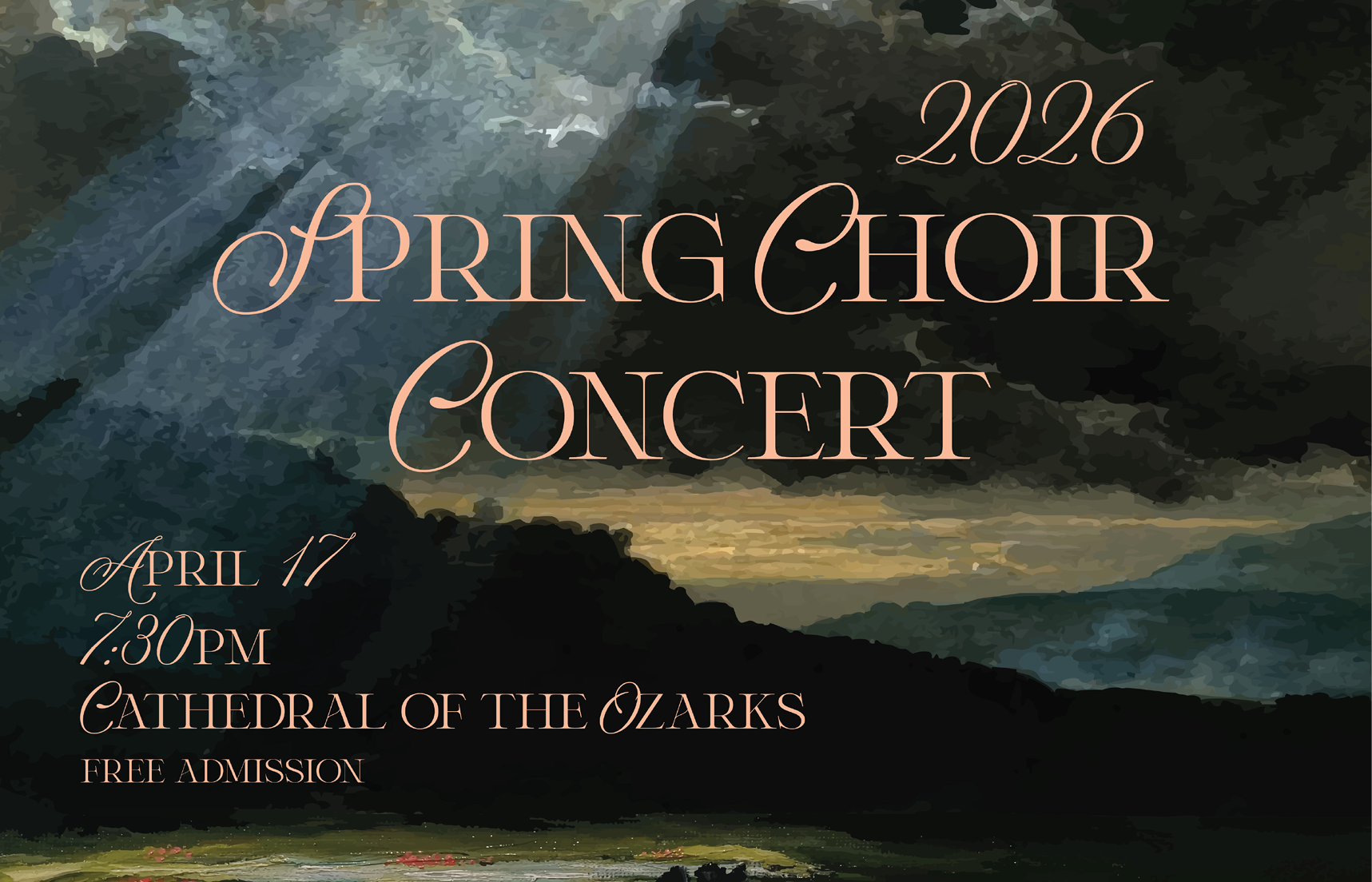
SILOAM SPRINGS, Arkansas (April 10, 2026) — John Brown University’s music & theatre department invites you to the Spring Choir Concert on Friday, April 17, at 7:30 p.m. in the Cathedral of the Ozarks on the JBU campus. Experience a moving evening centered on God’s mercy as the Cathedral Choir, University Chorus and Community Choir unite for a program that consoles, uplifts and renews hope. Enjoy the serene embrace of Duruflé’s “Requiem,” Byrd’s penitential “Miserere Mei,” Bach’s poignant “Crucifixus” and Vierne’s radiant “Kyrie.” The concert will feature soloists Jillian Wedfeldt (mezzo-soprano) and Heath Stark (baritone), with Paula Philips (flute), Annette Funk (piano), Bradley Vogel (organ) and Easton Hubbard (cello). Contemporary voices deepen the theme. Chilcott’s “Thou Knowest, Lord” offers tender assurance. Brahms’ “Lass dich nur nichts nicht dauren” counsels courage. Arnesen’s “Even When He Is Silent” affirms faith in darkness. "The spirit of mercy blossoms in American hymnody and gospel," said Seung-Won Cho, director of choral activities at JBU. "Works like 'It Is Well with My Soul,' 'For the Beauty of the Earth' and Dorsey’s 'Precious Lord' stand out. The Cho Bros add a prayerful lens with 'Prayer for Ukraine.' Hassler’s joyful 'Exultate Deo' leads into luminous spirituals like 'The Battle of Jericho,' 'Blessed Assurance,' 'John Saw the Number' and the triumphant 'A Mighty Fortress Is Our God.' This concert promises to renew your faith in God’s mercy that never fails." Doors open at 7:10 p.m. with free admission, and all are welcome to attend. For more information about JBU’s music programs and upcoming events, visit jbu.edu/academics/music/ or call (479) 524-7382. |
John Brown University is a leading private Christian university, training students to honor God and serve others since 1919. Arkansas’ top-ranked regional university (U.S. News) and No. 2 private university (The Wall Street Journal), JBU enrolls more than 2,500 students from 34 states and 43 countries in its traditional undergraduate, graduate, online and concurrent education programs. JBU offers over 50 undergraduate majors, with top programs including business, nursing, visual arts, engineering, teacher education, psychology, computer science, construction management, graphic design, family and human services, and engineering. Twelve graduate degrees are available in business, counseling and cybersecurity.
– 30 –
April 10, 2026



JBU Music & Theatre to Present 'Twelfth Night'
SILOAM SPRINGS, Arkansas (March 5, 2026) — John Brown University's music & theatre department invites you to a musical adaptation of William Shakespeare's “Twelfth Night,” March 13-14 at 7:30 p.m. and March 15 at 3 p.m. at Jones Recital Hall on the Siloam Springs campus.
Conceived by Kawme Kwei-Armah and Shaina Taub, this modern take on Shakespeare’s classic play tells a story of shipwrecked twins, a love triangle and mistaken identities. "Twelfth Night" is presented by arrangement with Concord Theatricals.
Liesl Dromi, associate professor of music (voice) and chair of the music & theatre department, said creating this version of “Twelfth Night” has been a wonderful collaborative process with students. Their vision for the show is to offer a Shakespeare experience that is accessible, exciting and inclusive.
“The genius of Shakespeare and the genius of this adaptation is that it is never just one thing,” said Dromi. “There are different levels of storytelling throughout. It’s rich and complex and a delight to work. The show really has a little bit of everything. We explore themes of identity, purpose, self-discovery and actualization — all in a setting that is fun, exciting, hilarious and feels like a nonstop party.”
You can purchase tickets at jbu.edu/tickets or at the door the night of the performance. Tickets are $15 for adults; $10 for seniors, faculty and staff; $7 for children under 18; and $3 for JBU students.
John Brown University is a leading private Christian university, training students to honor God and serve others since 1919. Arkansas’ top-ranked regional university (U.S. News) and No. 2 private university (The Wall Street Journal), JBU enrolls more than 2,500 students from 34 states and 43 countries in its traditional undergraduate, graduate, online and concurrent education programs. JBU offers over 50 undergraduate majors, with top programs including business, nursing, visual arts, engineering, teacher education, psychology, computer science, construction management, graphic design, family and human services, and engineering. Twelve graduate degrees are available in business, counseling and cybersecurity.
– 30 –
March 5, 2026

JBU Music & Theatre to Present 'Treasure Island'
SILOAM SPRINGS, Arkansas (Feb. 13, 2026) – John Brown University’s music & theatre department invites you to its production of Ken Ludwig’s “Treasure Island,” Feb. 19-20 at 7:30 p.m. and Feb. 21 at 2 p.m. in the Berry Performing Arts Center on the Siloam Springs campus.
Adapted from the classic novel by Robert Louis Stevenson, the play is a thrilling, swashbuckling tale of double-crossing pirates, hidden treasure and adventure on the high seas.
“Ken Ludwig’s adaptation of ‘Treasure Island’ is demanding every ounce of our collective theatre-making spirit,” said Josiah Wallace, JBU professor of theatre and certified actor combatant with the Society of American Fight Directors. “The production is massive in scope — an epic coming of age tale of pirate ships, deserted islands and the thin, dangerous line between adventure and betrayal."
Wallace said JBU's full team of student designers is working tirelessly to create a sensory world of intricate props, period costumes and immersive sounds and projections. Beyond the lines and the blocking, he said the actors are stepping into emotionally intense and quirky character roles requiring the flexing of sword and knife fighting skills to bring this high-sea adventure to life.
You can purchase tickets at jbu.edu/tickets or at the door the night of the performance. Tickets are $15 for adults; $10 for seniors, faculty and staff; $7 for children under 18; and $3 for JBU students.
John Brown University is a leading private Christian university, training students to honor God and serve others since 1919. Arkansas’ top-ranked regional university (U.S. News) and No. 2 private university (The Wall Street Journal), JBU enrolls more than 2,500 students from 34 states and 43 countries in its traditional undergraduate, graduate, online and concurrent education programs. JBU offers over 50 undergraduate majors, with top programs including business, nursing, visual arts, engineering, teacher education, psychology, computer science, construction management, graphic design, family and human services, and engineering. Twelve graduate degrees are available in business, counseling and cybersecurity.
–30–
February 13, 2026